

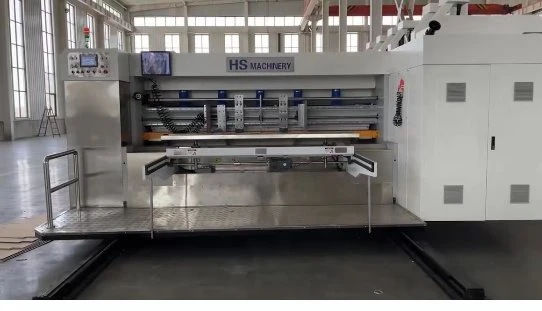
Model:1600x3600


Tech parameters
| Data/Model | 1600x3600 | 1600x4500 | 2200x3600 | 2200x4000 | 2200x4500 | 2200x5300 |
| Max Machine Speed(pcs/miny) | 120 | 100 | 100 | 100 | 80 | 80 |
| Max Feeding Size(mm) | 1570x3600 | 1570x4500 | 2100x3600 | 2100x4000 | 2100x4500 | 2100x5300 |
| Min Feeding Size(mm) | 450x800 | 500x800 | 550x920 | 550x920 | 550x920 | 600x920 |
| Max Printing Area(mm) | 1570x3550 | 1570x4450 | 2100x3550 | 2100x3950 | 2100x4450 | 2100x5250 |
| Thickness of Plate(mm) | 7.2 | 7.2 | 7.2 | 7.2 | 7.2 | 7.2 |
Paper feeding section operation instructions for 4 color flexo printing machine
Side Baffle Adjustment
The cardboard enters the feeding position according to the side baffles, which are evenly divided to both sides along the mechanical center line.
The cardboard is placed between the side baffles. The distance between the side baffles is adjusted by the motor. The motor rotates the lead screw, driving the nut so that the side baffles are against the cardboard. The distance between the side baffles should be slightly larger than the cardboard size (1-2mm).
Cleaning and Dust Removal Device for 4 color flexo printing machine
This device is located between the two sets of paper feeding rollers. Multiple rows of cleaning brushes are placed at the dust extraction port. The dust removal brushes rise and fall synchronously with the paper feeding gap adjustment, and work with a powerful dust extraction fan to effectively remove dust from the printing surface of the cardboard. Before the cardboard enters the printing section, it can clean and remove dust and paper scraps from the printing surface of the cardboard, making the printing clear and beautiful. The airflow section of the dust extraction port is adjustable.
Adjustment of blower pressure for 4 color flexo printing machine
According to the thickness, size and curvature of the cardboard, the isolation damper of the front edge paper feed roller box can be adjusted, and the speed of the blower can be changed by adjusting the frequency value of the inverter to achieve the purpose of adjusting the air pressure, thereby ensuring that the cardboard can enter the printing section straight.
Adjusting the Fan Pressure for 4 color flexo printing machine
Based on the thickness, size, and curvature of the cardboard, the damper of the leading edge feed roller box can be adjusted, and the fan speed can be changed by adjusting the frequency of the inverter to adjust the air pressure, thereby ensuring that the cardboard enters the printing section straight.
Sequence for Replacing the Feed Roller for 4 color flexo printing machine
● Separate and move the feed section, ensuring a walkway of at least 600mm between the feed section and the printing section.
● Turn off the main power, the power supply to the electrical control box, and the power supply to the control panel.
● Support both ends of the feed roller shaft with hemp rope.
● Remove the 8 screws at the left and right feed roller shafts at both ends of the feed roller. (See the diagram below)
● Use a crane to lift and replace the feed roller; (the new feed roller must be covered with a protective film during replacement)
● Wipe the left and right feed roller shafts with a cloth and then apply grease.
● Place the paper feed rubber rollers upside down on the left and right paper feed roller shafts, carefully checking their left and right positions.
Then, tighten the eight screws on the left and right paper feed roller shafts.
● Use the paper feed conveyor steel roller (bottom) as the reference for adjusting the parallelism and clearance of the paper feed rubber rollers.
Hot Tags: 4 color flexo printing machine, China 4 color flexo printing machine manufacturers, suppliers, factory, Flexo Corrugated Box Printing Machine, flexible packaging printing, Fully Automatic Corrugated Box Making Machine, Flexo Printing Machine For Corrugated Carton, Fully Automatic Carton Box Making Machine, 4 Color Flexo Printing Machine


