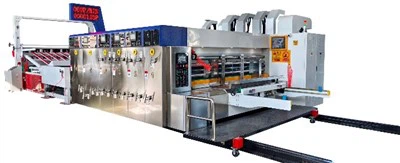


Model:1200x2400

Tech parameters
|
Data/model |
900x2000 |
900x2400 |
1200x24000 |
1200x2800 |
1400x2400 |
1400x2800 |
1600x2800 |
1600x3200 |
1600x3600 |
|
Max machine speed(pcs/min) |
300 |
300 |
250 |
220 |
220 |
200 |
200 |
180 |
120 |
|
Max feeding size(mm) |
880x2000 |
880x2400 |
1180x2400 |
1180x2800 |
1380x2400 |
1380x2800 |
1570x2800 |
1570x3200 |
1570x3600 |
|
Min feeding size(mm) |
280x660 |
280x660 |
320x680 |
320x680 |
360x680 |
360x680 |
420x710 |
420x710 |
420x710 |
|
Skip feeding(mm) |
1100x2000 |
1100x2400 |
1500x2400 |
1500x2800 |
1700x2400 |
1700x2800 |
1900x2800 |
1900x3200 |
1900x3600 |
|
Max printing area(mm) |
850x2000 |
850x2400 |
1150x2400 |
1150x2800 |
1350x2400 |
13500x2800 |
1540x2800 |
1540x3200 |
1540x3600 |
|
Thickness of printing plate(mm) |
7.2 |
7.2 |
7.2 |
7.2 |
7.2 |
7.2 |
7.2 |
7.2 |
7.2 |
Host activation Operation for Flexo corrugated box printing machine
1. Acceleration/deceleration adjustments can only be made when the main unit's operation switch is activated (the indicator light will be on).
2. Push-button switch: Increase operating speed.
3. Push-button switch: Decrease operating speed.
4. In case of emergency, pressing the emergency stop switch will stop the main unit from operating of Flexo corrugated box printing machine.
1. The speedometer displays the number of sheets of cardboard produced per minute. Paper feeding is only possible when the machine speed is ≥ 30 PCM.
2. To stop operation, first reduce the operating speed to "0" before pressing the main unit stop switch. The "Stop" indicator light will illuminate when the main unit is activated.
3. The machine will not continue feeding paper when the production quantity display is set to "0" or the set quantity has been reached.
4. An alarm bell will sound before the main unit is activated to alert personnel and prevent potential hazards.
5. Avoid using the emergency stop switch in non-emergency situations; please stop operation according to the normal procedure.
Auxiliary air intake (Manual adjustment) for Flexo corrugated box printing machine
In order to smoothly push the cardboard into the feed rollers, it must be flush against the ribbed paper feed table.
2. Any extra suction vents must be covered or sealed to stop air leaks if the cardboard is smaller than the paper feed table's suction range.
2. Rotate the switch to change the suction power based on the cardboard's size and degree of warping.
3. To extend the suction area, remove the first suction baffle on the paper feed table if longer cardboard pieces cannot fall smoothly due to insufficient suction at the back end. (Remember to reinsert the baffle to stop air leaks while handling small pieces of cardboard.)
4. Look for pipe obstructions or air leaks if the suction power is inadequate.
Hot Tags: flexo corrugated box printing machine, China flexo corrugated box printing machine manufacturers, suppliers, factory, Flexo Corrugated Box Printing Machine, flexible packaging printing, Fully Automatic Corrugated Box Making Machine, Flexo Printing Machine For Corrugated Carton, Fully Automatic Carton Box Making Machine, 4 Color Flexo Printing Machine