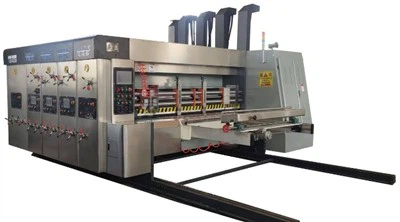


Model:900x2400

Tech parameters
| Data/model | 900x2000 | 900x2400 | 1200x24000 | 1200x2800 | 1400x2400 | 1400x2800 | 1600x2800 | 1600x3200 | 1600x3600 |
| Max machine speed(pcs/min) | 300 | 300 | 250 | 220 | 220 | 200 | 200 | 180 | 120 |
| Max feeding size(mm) | 880x2000 | 880x2400 | 1180x2400 | 1180x2800 | 1380x2400 | 1380x2800 | 1570x2800 | 1570x3200 | 1570x3600 |
| Min feeding size(mm) | 280x660 | 280x660 | 320x680 | 320x680 | 360x680 | 360x680 | 420x710 | 420x710 | 420x710 |
| Skip feeding(mm) | 1100x2000 | 1100x2400 | 1500x2400 | 1500x2800 | 1700x2400 | 1700x2800 | 1900x2800 | 1900x3200 | 1900x3600 |
| Max printing area(mm) | 850x2000 | 850x2400 | 1150x2400 | 1150x2800 | 1350x2400 | 1350x2800 | 1540x2800 | 1540x3200 | 1540x3600 |
| Thickness of printing plate(mm) | 7.2 | 7.2 | 7.2 | 7.2 | 7.2 | 7.2 | 7.2 | 7.2 | 7.2 |
Operation for slotting part of carton box printing machine
Grooving tool engagement and adjustment (Manual adjustment)
1. Adjust the closing depth of the upper and lower slotting blades according to the thickness of the cardboard.
2. The closing depth should be just enough to cut the cardboard. Too deep a depth increases the machine load and produces burrs on the cut for Carton box printing machine
3. When changing the corner blade closing depth, replace the blade according to the cardboard thickness or make additional adjustments to the corner blade holder.
4. When adjusting the grooving knife engagement depth, the engagement depths of the trimming and corner knives also change simultaneously
5. For three- and five-layer cardboard, the corner knife blade height needs to be changed to avoid over-cutting and damage to the machine or blades of Carton box printing machine
6. If the knife holder cannot properly guide the paper, the engagement depth can be increased or a paper guide strip can be added.
Box height slotting adjustment (Electric adjustment)
1. Adjust the spacing between the front and rear slotting blades according to the height of the carton.
2. Switch to "Automatic" for setting adjustments and to "Manual" for inching adjustments.
3. If the slotting blade length is insufficient within the machine's specifications, a slotting blade of the same specification but a different length can be purchased separately for connection Carton box printing machine
4. Adjust the front and rear blade dimensions to adjust the box height.
5. When the corner blade's cutting position differs from the grooving blade (the edge and box height differ), the corner blade's fixing screws must be loosened individually to adjust its position.
6. When adjusting the box height grooving interval, the grooving blades and corner blades on each side should move synchronously.
Hot Tags: carton box printing machine, China carton box printing machine manufacturers, suppliers, factory, Packaging Box Printing Machine, Paper Box Printing Machine, Automatic Cardboard Box Making Machine, Carton Box Printing Machine, Pizza Box Printing Machine, corrugated box printing machine